Morse code, practiced properly
Learn to hear
the dots and dashes.
Kyulemorse is a Morse code trainer for Android and iOS — send, receive and decode real Morse code, with practice that builds up letter by letter as you improve.
Free to download — start practicing instantly. No login or internet required. Beginner-friendly, with enough depth to challenge the experts.
Inside the app
Three modes, one skill
Every operator has to learn both directions — putting a signal out, and pulling one out of the noise. Kyulemorse practices both, plus the version where nobody typed the code for you.
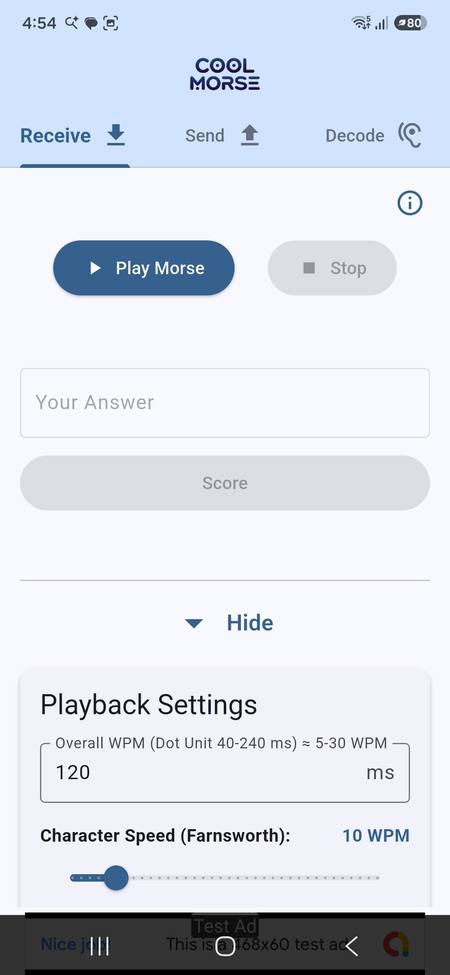
01 · Receive
Train your ear
The app plays a Morse phrase; you type back what you heard and get scored on it.
- Builds up letter by letter as you improve, or practice with customized random text
- Type answers, or tap them out on a custom keyboard
- Tune playback WPM and Farnsworth spacing per session
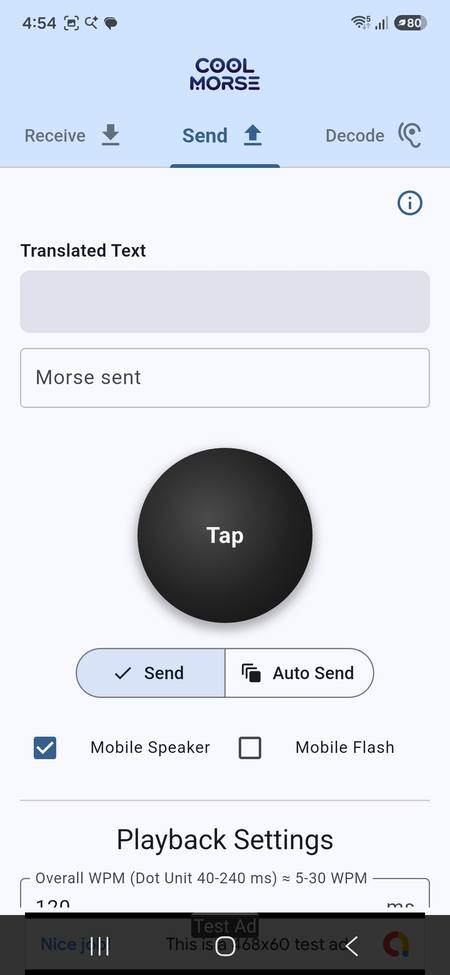
02 · Send
Practice keying
Tap out Morse by hand, or type text and let Auto Send transmit it for you.
- Manual keying with a real dot / dash visualizer
- Auto Send converts typed text or raw Morse to tone
- Speaker or camera flash as the output
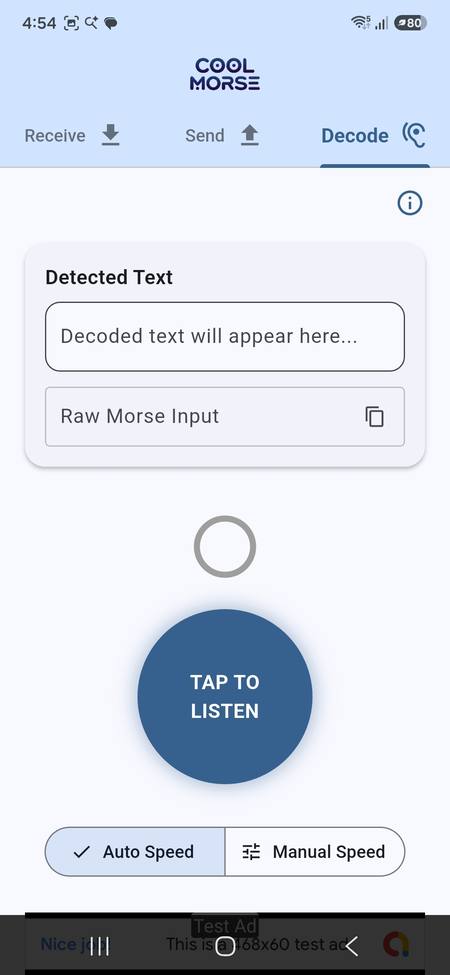
03 · Decode
Listen to the real thing
Point the microphone at an actual signal — a radio, a key, another person — and watch it turn into text.
- Real-time decoding straight from the mic
- Auto Speed adapts to whatever WPM comes in
- Manual Speed for when you already know the rate
Why bother learning it
Morse — still the most reliable signal there is
Morse survives because it needs almost nothing to work — a tone, a light, a tap. That's exactly why it's still worth knowing.
Ham radio & CW
CW licenses and contests still run on hand-keyed Morse — Kyulemorse builds the same letter-by-letter fluency real CW instructors teach.
Works when nothing else does
No signal bars needed — a light, a whistle or a tap gets a message through when voice and data can't.
An accessible alternative
A single switch — tap, blink, or click — is enough to communicate, no keyboard or touchscreen precision required.
Genuinely good focus practice
Decoding by ear is timing and pattern recognition under pressure — a short, satisfying kind of practice on its own.
Questions
Before you download
What can I do today, and what needs the phone's mic or speaker?
Receive and Send work with just the screen, speaker (or camera flash), and your fingers. Decode needs the microphone, since it's listening for real Morse audio around you rather than something generated in-app.
Is Kyulemorse free to use?
Yes. Receive, Send and Decode are all free to use, with an optional subscription that unlocks deeper practice sets.
Do I need to already know Morse code to start?
No. Kyulemorse is built for complete beginners — practice starts with just a couple of letters and grows one letter at a time as you improve, at whatever pace suits you.
Can I practice sending Morse code, not just receiving it?
Yes. Send mode lets you tap out Morse by hand on a real dot/dash keyer, or type text and have Auto Send transmit it back to you as tone, light or vibration.
Can Kyulemorse decode real Morse code, not just practice audio?
Yes. Decode mode listens through your phone's microphone and turns real Morse signals — from a radio, a hand key, or another person — into text.
Is Kyulemorse useful for ham radio (CW) practice?
Yes. It's a good fit for anyone working toward a ham radio license or building CW copying and keying speed, as well as people learning Morse code just for fun.
Does Kyulemorse work without an internet connection?
Yes. Receive, Send and Decode all work fully offline, so you can practice Morse code anywhere without needing data or Wi-Fi.
Does Kyulemorse keep track of my progress?
Yes. Your scores and practice history are saved on your device, so you can see how your speed and accuracy improve over time.
·– ··· ·–·· ·–– –·–·
Ready to start sending?
Kyulemorse is live on Google Play and the App Store — install it and start practicing Send, Receive and Decode today.


Free to download.
Try it
Hear it in Morse
Type or paste a message and press Play. It plays in your browser. Nothing is sent anywhere.
Morse code
Advanced
Characters play at this speed and the gaps stretch to keep your overall speed. It can't go below the overall speed.
Sorry, your browser doesn't support Web Audio, so playback isn't available here. The Morse code for your text still shows above.
Got thoughts?
Send us feedback
Bug, feature idea, or just how your first practice session went — tell us directly.